
The Evolution of UX Design: Shaping the Digital Future

In an increasingly digital world, user experience (UX) design has evolved from a nice-to-have feature to a critical component of product development. As we look toward the future, the field of UX design is poised for transformative changes that will reshape how we interact with technology and digital spaces.

The Current State of UX Design

User experience design has matured significantly over the past decade. Today’s UX designers work at the intersection of psychology, technology, and design, creating interfaces that are not just functional but emotionally resonant. Modern UX design principles emphasize accessibility, inclusivity, and human-centered design approaches that put users’ needs at the forefront of product development.

Emerging Trends Reshaping UX Design

AI-Powered Personalization

Artificial intelligence is revolutionizing UX design by enabling hyper-personalized experiences. Machine learning algorithms can analyze user behavior patterns and preferences to create dynamic interfaces that adapt in real-time. This level of personalization will become increasingly sophisticated, with AI systems predicting user needs before they’re explicitly expressed.

Voice and Gestural Interfaces

As we move beyond traditional screen-based interactions, voice user interfaces (VUI) and gesture controls are becoming more prevalent. The challenge for UX designers lies in creating intuitive, multimodal experiences that seamlessly blend different interaction methods while maintaining consistency and user comfort.

Immersive Experiences

Virtual reality (VR) and augmented reality (AR) are opening new frontiers in UX design. These technologies demand entirely new design paradigms that account for spatial awareness, physical movement, and three-dimensional interaction patterns. As these technologies become more mainstream, UX designers will need to develop new skills and methodologies for creating immersive experiences.

The Future of UX Design

Ethical Design Takes Center Stage

As technology becomes more integrated into our daily lives, ethical considerations in UX design will become paramount. Designers will need to balance business objectives with user wellbeing, addressing concerns about digital addiction, privacy, and algorithmic bias. This shift will lead to the emergence of new frameworks for ethical design practices.

Biometric Integration

The integration of biometric data into UX design will enable more natural and responsive interfaces. Emotions, stress levels, and physical states will influence how interfaces adapt to users, creating more empathetic and human-centric experiences. This development will require UX designers to understand both the technical and ethical implications of biometric data usage.

Sustainable UX Design

Environmental consciousness will increasingly influence UX design decisions. Designers will need to consider the environmental impact of their digital products, from server energy consumption to user behavior patterns that affect carbon footprints. This will lead to the development of new metrics for measuring and optimizing the environmental impact of digital experiences.

Skills for Future UX Designers

Tomorrow’s UX designers will need a broader skill set that includes:

  • Data analysis and interpretation
  • Understanding of AI and machine learning principles
  • Knowledge of privacy and security best practices
  • Expertise in cross-cultural design
  • Proficiency in designing for emerging technologies
  • Strong ethical decision-making capabilities

Challenges and Opportunities

The evolution of UX design presents both challenges and opportunities. Privacy concerns, technological limitations, and the need to design for diverse user groups will continue to test designers’ abilities. However, these challenges also present opportunities for innovation and the development of new solutions that better serve user needs.

Conclusion

The future of UX design is both exciting and complex. As technology continues to evolve, the role of UX designers will become increasingly important in shaping how humans interact with digital systems. Success in this field will require a commitment to continuous learning, ethical considerations, and a deep understanding of human behavior and needs.

The designers who thrive in this future landscape will be those who can balance technological innovation with human-centered design principles, creating experiences that are not just usable, but meaningful and enriching to users’ lives. As we move forward, the focus will shift from merely designing interfaces to crafting holistic digital experiences that seamlessly integrate with and enhance our daily lives.
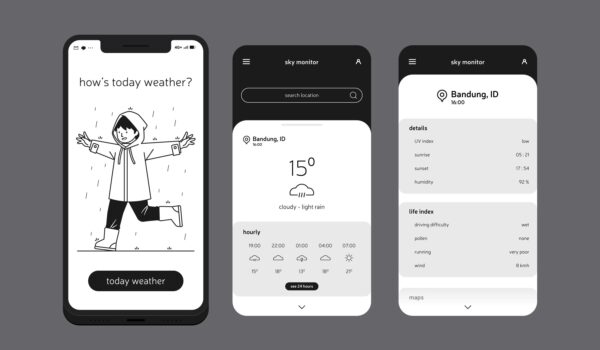
Why Prototypes Are Your Best Friend in UX Design: A Student’s Perspective 📱

Hey there! As a design student who’s been deep in the UX world for the past few semesters, I’ve learned that prototypes are basically like your favorite coffee shop – you can’t imagine life without them. Let me break down why they’re absolutely crucial in UX design.

The Real Talk About Prototypes 🎯

First things first – prototypes are like the rough drafts of the digital world. They’re not perfect, and that’s exactly the point! Think of them as the UX equivalent of trying on clothes before buying them. You wouldn’t buy a pair of jeans without trying them on, right? Same goes for digital products!

Why Prototypes Are Actually Life-Savers

1. They Save You From Embarrassing Mistakes 😅

  • Catch problems early before they become expensive disasters
  • Test your ideas without writing a single line of code
  • Figure out if something’s awkward before your users do

2. They Help You Get Better Feedback

  • Users can actually click through your design
  • Stakeholders understand your vision better
  • Your professors can give more specific feedback (trust me on this one!)

3. They’re Great for Team Projects

  • Everyone gets on the same page
  • Easier to divide work
  • Makes group presentations way smoother

The Student Budget-Friendly Approach 💰

Let’s be real – we’re students, and professional tools can be expensive. Here’s how I make it work:

Free Tools That Actually Rock:

  • Figma (my personal favorite)
  • Adobe XD (free with student email)
  • InVision (basic version)

Quick Tips from My Experience:

  1. Start with paper prototypes (yes, really!)
  2. Move to digital wireframes
  3. Build interactive prototypes
  4. Test with your roommates (they make great guinea pigs)

Real Student Project Examples

Last semester, I worked on a food delivery app prototype. Here’s what I learned:

What Worked:

  • Started with simple sketches
  • Used Figma for the final prototype
  • Tested with other students
  • Got feedback early and often

What Didn’t:

  • Trying to make it perfect first try (big mistake)
  • Waiting too long to show others
  • Overthinking the design

Why Your Professors Are Actually Right About This

I used to think prototypes were just extra work, but now I get it. They’re like the safety net when you’re learning to:

  • Present your ideas professionally
  • Work through complex user flows
  • Prove your concepts work

Tips for Fellow Students 📚

Do’s:

  • Start simple
  • Update regularly
  • Keep your files organized
  • Back up your work (learned this the hard way)

Don’ts:

  • Overcomplicate your first version
  • Skip the testing phase
  • Ignore feedback
  • Wait until the last minute

The Career Perspective 💼

One thing that I can say when it comes to geting a job in the User Design field is that you mainly have two options that you all can you from: 1. Get hored by a company who is looking for a dedicated UX Designer. Or 2. Become a Freelancer.

If you go the route of being hired by a company to be a UX Designer, especially when coming out of school, you should make sure to have a portfolio that will not only get you hired in the field but also help you show future employers how talented you are and what you can achieve.

On the other hand, if you go in the Freelance route when coming out of school. You should keep in mind that starting out is going to be challenging because as a new UX Designer, you won’t be able to easily get the client you need and build the reputation that you deserve in the field. Especially when it comes to competing against people who have an established business and reputations on pages like Fiverr, Upwork, PeoplePerHour, and many more.

In conclusion, depending on the route that you choose when coming out of school. Becoming a UX Designer as a whole can be either challenging or a hassle. But it can also be the most rewarding and humbling process that you can go through. Which will ultimately help you be a successful UX Designer in the future.

Conclusion

As a student diving into UX design, I’ve learned that prototypes aren’t just deliverables – they’re learning tools. They help you think better, work smarter, and create designs that actually make sense to users.

Remember: Your first prototype will probably look nothing like your final design, and that’s totally okay! The point is to learn and improve with each iteration.

Quick Action Steps:

  1. Download a prototyping tool today like Figma, Sketch, or AdobeXD
  2. Start with a simple project
  3. Share with classmates
  4. Iterate based on feedback
  5. Keep building your skills

Stay curious and keep prototyping!

Written by a sleep-deprived but passionate UX design student who’s learned these lessons the hard way so you don’t have to! ✌️

User Experience and Accessibility: A Perfect Pair

User experience (UX) and accessibility are two sides of the same coin when it comes to video games. While UX focuses on creating enjoyable and intuitive experiences for all players, accessibility ensures that games are playable by people with disabilities.

How UX and Accessibility Intersect

At their core, both UX and accessibility aim to create positive experiences. Good UX design considers the needs of the user and provides intuitive interfaces, clear instructions, and engaging game-play. Accessibility takes this a step further by ensuring that these experiences are available to everyone, regardless of their abilities.

For example, a game with well-designed controls and clear visual cues is not only good UX but also accessible to players with motor impairments. Similarly, subtitles and audio descriptions enhance the experience for players who are deaf or hard of hearing, improving both accessibility and overall enjoyment.

The Accessibility Gap in Video Games

While the gaming industry has made strides in accessibility, many games still lack features that would significantly improve the experience for players with disabilities. Some common accessibility issues include:

  • Visual Impairments: Lack of sufficient color contrast, small font sizes, and absence of text-to-speech options.
  • Hearing Impairments: Inadequate or missing subtitles, lack of audio cues, and absence of vibration feedback.
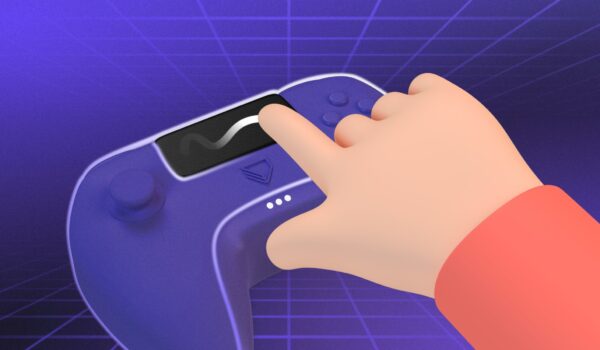
  • Motor Impairments: Limited controller customization, difficulty remapping buttons, and lack of support for alternative input devices.
  • Cognitive Impairments: Complex control schemes, overwhelming menus, and lack of difficulty options.

Why Accessibility Matters

Accessibility is not just a moral imperative; it’s good business. By making games more accessible, developers can reach a wider audience and create a more inclusive gaming community. Additionally, accessible games can provide significant benefits to players with disabilities, including:

  • Social Inclusion: Games can be a powerful tool for social interaction and connection.
  • Cognitive Benefits: Games can improve problem-solving skills, memory, and attention span.
  • Emotional Well-being: Games can provide a sense of accomplishment, relaxation, and escape.

Moving Forward

To create truly inclusive gaming experiences, developers need to prioritize accessibility from the beginning of the development process. This includes:

  • Consulting with Accessibility Experts: Involving disability advocates and accessibility specialists in the design process.
  • Using Accessibility Guidelines: Following established guidelines like the Web Content Accessibility Guidelines (WCAG) and the Game Accessibility Guidelines (GAG).
  • Testing with Diverse Players: Conducting play testing sessions with players with disabilities to identify and address accessibility barriers.
  • Providing Customization Options: Allowing players to adjust settings like difficulty, control schemes, and visual cues.

By embracing accessibility as a core principle of game design, developers can create games that everyone enjoys, regardless of their abilities. This would also open the doors to gaming for many people around the world, helping to inspire the future generation to do things that may seem hard to reach and do in their lives. And lastly, create new types of jobs for people who live in countries that may not have all the resources that we have in the United States.

Sources

https://accessiblyapp.com/blog/video-game-accessibility/

https://sonyinteractive.com/en/news/blog/accessibility-making-gaming-better-for-everyone

https://www.testdevlab.com/blog/accessibility-testing-in-video-games

https://www.frontiersin.org/journals/psychiatry/articles/10.3389/fpsyt.2023.1257685/full

Interaction Design Guidelines