Hey there! As a design student who’s been deep in the UX world for the past few semesters, I’ve learned that prototypes are basically like your favorite coffee shop – you can’t imagine life without them. Let me break down why they’re absolutely crucial in UX design.
The Real Talk About Prototypes 🎯
First things first – prototypes are like the rough drafts of the digital world. They’re not perfect, and that’s exactly the point! Think of them as the UX equivalent of trying on clothes before buying them. You wouldn’t buy a pair of jeans without trying them on, right? Same goes for digital products!
Why Prototypes Are Actually Life-Savers
1. They Save You From Embarrassing Mistakes 😅
- Catch problems early before they become expensive disasters
- Test your ideas without writing a single line of code
- Figure out if something’s awkward before your users do
2. They Help You Get Better Feedback
- Users can actually click through your design
- Stakeholders understand your vision better
- Your professors can give more specific feedback (trust me on this one!)
3. They’re Great for Team Projects
- Everyone gets on the same page
- Easier to divide work
- Makes group presentations way smoother
The Student Budget-Friendly Approach 💰
Let’s be real – we’re students, and professional tools can be expensive. Here’s how I make it work:
Free Tools That Actually Rock:
- Figma (my personal favorite)
- Adobe XD (free with student email)
- InVision (basic version)
Quick Tips from My Experience:
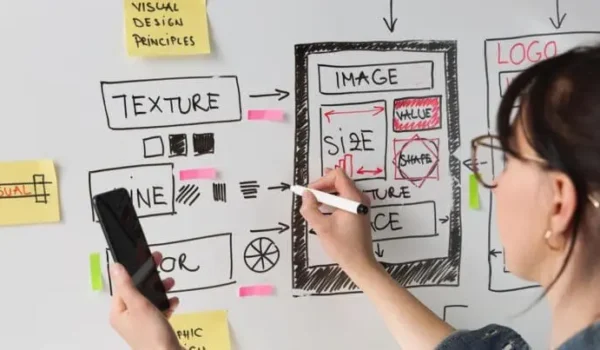
- Start with paper prototypes (yes, really!)
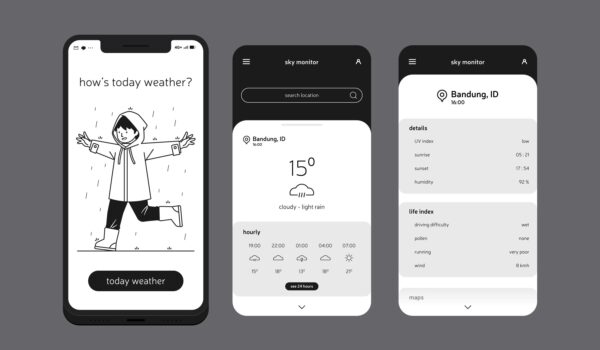
- Move to digital wireframes
- Build interactive prototypes
- Test with your roommates (they make great guinea pigs)
Real Student Project Examples
Last semester, I worked on a food delivery app prototype. Here’s what I learned:
What Worked:
- Started with simple sketches
- Used Figma for the final prototype
- Tested with other students
- Got feedback early and often
What Didn’t:
- Trying to make it perfect first try (big mistake)
- Waiting too long to show others
- Overthinking the design
Why Your Professors Are Actually Right About This
I used to think prototypes were just extra work, but now I get it. They’re like the safety net when you’re learning to:
- Present your ideas professionally
- Work through complex user flows
- Prove your concepts work
Tips for Fellow Students 📚
Do’s:
- Start simple
- Update regularly
- Keep your files organized
- Back up your work (learned this the hard way)
Don’ts:
- Overcomplicate your first version
- Skip the testing phase
- Ignore feedback
- Wait until the last minute
The Career Perspective 💼
One thing that I can say when it comes to geting a job in the User Design field is that you mainly have two options that you all can you from: 1. Get hored by a company who is looking for a dedicated UX Designer. Or 2. Become a Freelancer.
If you go the route of being hired by a company to be a UX Designer, especially when coming out of school, you should make sure to have a portfolio that will not only get you hired in the field but also help you show future employers how talented you are and what you can achieve.
On the other hand, if you go in the Freelance route when coming out of school. You should keep in mind that starting out is going to be challenging because as a new UX Designer, you won’t be able to easily get the client you need and build the reputation that you deserve in the field. Especially when it comes to competing against people who have an established business and reputations on pages like Fiverr, Upwork, PeoplePerHour, and many more.
In conclusion, depending on the route that you choose when coming out of school. Becoming a UX Designer as a whole can be either challenging or a hassle. But it can also be the most rewarding and humbling process that you can go through. Which will ultimately help you be a successful UX Designer in the future.
Conclusion
As a student diving into UX design, I’ve learned that prototypes aren’t just deliverables – they’re learning tools. They help you think better, work smarter, and create designs that actually make sense to users.
Remember: Your first prototype will probably look nothing like your final design, and that’s totally okay! The point is to learn and improve with each iteration.
Quick Action Steps:
- Download a prototyping tool today like Figma, Sketch, or AdobeXD
- Start with a simple project
- Share with classmates
- Iterate based on feedback
- Keep building your skills
Stay curious and keep prototyping!
Written by a sleep-deprived but passionate UX design student who’s learned these lessons the hard way so you don’t have to! ✌️